
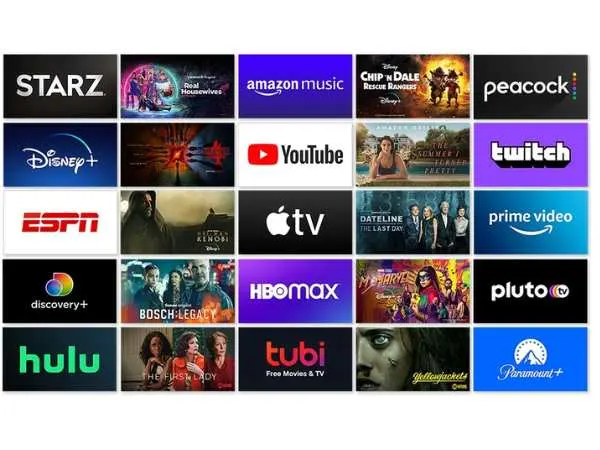
The Amazon Fire Stick has seriously changed the way we watch TV. Like, who still waits for cable shows when you can stream your favorite movies, live sports, and even music—whenever you want? Just plug that tiny device into your TV’s HDMI port, and boom—you’ve got access to thousands of apps.
But with so many options out there, finding the best apps can feel like scrolling endlessly through a movie list at 2 a.m. (we’ve all been there). So to save you from the hassle, I’ve put together a list of the 10 best apps for Amazon Fire Stick — whether you’re into binge-watching, live sports, or just chilling with music.
1. Kodi
Let’s start with the OG of streaming: Kodi. This open-source media player is like a control center for all your entertainment. It lets you organize and stream content from your local library and add tons of plugins for free movies, shows, sports, and even radio.
What’s great about Kodi is the flexibility—it works on almost anything, and you can personalize it however you like. You can even cast your phone photos onto your TV. Just one small tip: use a VPN while streaming to keep your privacy safe.
⭐ Rating: 4.7/5
2. Netflix
Obviously, Netflix had to make this list. It’s pretty much the face of streaming today. With endless shows, movies, documentaries, and original hits like Stranger Things and Money Heist, Netflix is the go-to app for most Fire Stick users.
The best part? One subscription works across all devices, including your Fire Stick, mobile, and laptop. And if you use a VPN, you can even unlock regional content (like watching U.S. shows from India or vice versa).
⭐ Rating: 4.8/5
3. YouTube
Who doesn’t love a late-night YouTube rabbit hole? Whether it’s tech reviews, funny clips, or cooking hacks—you name it, it’s there. The Fire Stick version of YouTube gives you that same experience on a bigger screen, and it’s even better if you sync it with your Google account.
You can use voice commands, play playlists, and even cast from your phone directly. It’s free, simple, and just… addictive.
⭐ Rating: 4.6/5
4. HBO Max
Now, if you love premium content, HBO Max is pure gold. You get access to Game of Thrones, The Last of Us, Friends, and tons of blockbusters. What’s cool is that it also hosts Warner Bros., DC, and Cartoon Network titles all in one place.
It’s a bit on the pricier side, but the quality and exclusives totally make up for it. You’ll never run out of something worth watching.
⭐ Rating: 4.5/5
also read : – Basic Calculator Online Free
5. Viva TV
Viva TV is a hidden gem among Fire Stick apps. It’s packed with free movies, live TV, and even anime or Korean dramas. The interface is super easy to navigate, and you can stream in HD or even 4K if your internet can handle it.
There’s also an autoplay feature and subtitle customization, which is a nice touch. Just remember, for smooth and private streaming, pairing it with a VPN is a smart move.
⭐ Rating: 4.4/5
6. Typhoon TV
If you miss Terrarium TV, you’ll love Typhoon TV. It’s fast, ad-free, and offers a clean interface. The app scrapes tons of HD links from trusted sources and works great with Real Debrid for high-speed streams.
Plus, you can use it with VLC Player for an even better viewing experience. It’s one of those apps that feels premium even though it’s completely free.
⭐ Rating: 4.6/5
7. CatMouse
CatMouse is another Terrarium-inspired app that’s become a fan favorite. It offers a massive library of movies and TV shows, with full-HD links that actually work. You can even turn on notifications for new episode alerts (which is a game changer for binge-watchers).
Its smooth performance and updated UI make it one of the best Fire Stick apps right now for streaming shows without buffering nightmares.
⭐ Rating: 4.5/5
8. BeeTV
BeeTV isn’t just another streaming app—it’s an aggregator. That means it pulls streaming links from across the web and puts them all in one place for you. You can even request missing movies or shows through its Special Request feature.
The content library is updated constantly, so you’ll always find something new to watch. Whether you’re into classics or the latest releases, BeeTV’s got you covered.
⭐ Rating: 4.7/5
9. Pluto TV
If you love live TV but don’t want to pay for cable, Pluto TV is perfect. It offers hundreds of live channels, including news, sports, movies, and even kids’ content.
What’s cool is—it’s completely free and doesn’t even need an account. You can jump right into live streams or explore the on-demand section for older shows and films.
⭐ Rating: 4.3/5
also read : – Ad Blocker for iPhone
10. Spotify
Sometimes, you just want to unwind with good music. That’s where Spotify comes in. With your Fire Stick, you can stream your favorite playlists, podcasts, or even ambient sounds right on your TV speakers.
It’s perfect for house parties, workouts, or just relaxing evenings. Sync it with your phone and control everything from your couch. Easy peasy.
⭐ Rating: 4.8/5
Benefits of Amazon Fire TV Stick
Let’s be honest—this little device packs a punch. Here’s why it’s worth it:
✅ Access to Thousands of Apps: From Netflix to Spotify, it’s all just a click away.
✅ Portable & Compact: Take it anywhere, plug it into any TV, and you’re good to go.
✅ Voice Control: Alexa makes navigation insanely easy.
✅ Affordable Streaming: No monthly fees beyond your subscriptions.
✅ Parental Controls: Great for families with kids.
✅ 4K & HDR Support: The quality is just stunning on compatible TVs.
It’s literally like turning a regular TV into a smart powerhouse.
Drawbacks of Amazon Fire TV Stick
No product’s perfect, right? Here are a few downsides worth mentioning:
❌ Limited Storage: You might run out of space if you install too many apps.
❌ Internet Dependence: No Wi-Fi means no streaming.
❌ Occasional Lag: Older models can slow down after heavy use.
❌ Ads and Promotions: Amazon’s interface sometimes pushes its own shows too aggressively.
❌ Region Restrictions: Some apps or content may not be available in every country.
Still, considering its features and price, most users don’t really mind these small issues.
FAQs on Amazon Fire Stick and Apps
1. Is the Amazon Fire Stick worth buying?
Absolutely. For its price, it’s one of the best streaming devices. You get access to thousands of apps, great performance, and Alexa support.
2. Can I use Fire Stick without an Amazon Prime subscription?
Yes! You can still use apps like Netflix, YouTube, or Pluto TV without Prime. Prime just adds extra benefits.
3. Is Kodi safe to use on Fire Stick?
Yes, Kodi itself is safe. Just make sure to use trusted add-ons and a VPN to protect your privacy.
4. How much internet speed do I need for smooth streaming?
Ideally, 10 Mbps for HD and 20 Mbps for 4K content. Anything less might cause buffering.
5. Can I install third-party apps on Fire Stick?
Yes, you can sideload apps not available on the Amazon App Store—but always make sure they’re from reliable sources.