
Ads are always annoying and obviously, they speed down your work for a moment. Ad blockers are the effective tools that will help you to get rid of these irritating ads and notifications. The main role of an ad blocker is to prevent unwanted online advertising advertisements. It is important to choose the most effective one which can easily sort out your problems while using an iPhone device. In this blog we are going to tell you the Ad Blocker For IPhone, so read this full blog carefully to get the complete information.
How to choose the best ad blocker for iPhone or iOS?
Apple products require special programs to block ads and trackers. Third-party apps ensure enhancing your device security. Find the best ad blocker for iPhone by using the given points:
- Find the app capable of blocking ads, pop-ups, redirects, banners, fake close buttons, etc.
- App should also block ad trackers to make your browsing experience more private.
- Ability to whitelist certain domains or email addresses.
- Minimum size of app to avoidtoo much space or battery drainingon your iPhone.
Excellent Ad blockers for iPhone
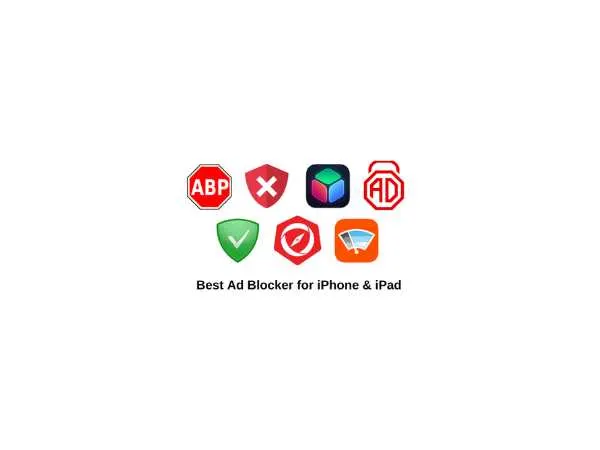
Following are some of the favorite ad blockers which will help you to get rid of irritating ads. Also, they will speed up your web browsing experience:
AdGuard
It is an effective ad blocker which is helpful to block different types of ads to speed up your Safari browsing on iPhone devices. With Ad Guard, you can set up rules for specific websites and manually block ads from sites. This lightweight adblocker basically cleans up your browsing experience and makes it smoother as well as block trackers from social media sites.
1Blocker
This ad blocker will help you to get rid from the specific websites’ access. Being fully customized, 1Blocker can be used to set different rules for blocking ads, cookies, trackers, website comments, Twitter and Facebook widgets and much more. In addition, you can also customize whether to block or allow cookies and page elements from specific sites. It is completely free to download and you can easily block ads or trackers. If you want some additional features to customize your web browsing experience then get an idea of being able to set up rules for different websites by purchasing the premium of 1Blocker which is completely worth its amount.
also read : – Best Apps for Payment in India
Block Bear
In order to avoid website clutter and screen space by ads, install BlockBear app in your iPhone. It will effectively help you to remove trackers, ads and social buttons. Also, it ensures privacy by blocking cookies, beacons and scripts. BlockBear is lightweight, has an elegant interface and allows sites to load faster than their usual speed.
Clario
It is one of the ultimate ad blocker apps for iPhone when it comes to online safety. Along with securing your Wi-Fi data with a built-in VPN, Clario also monitors for password breaches and protects your Instagram account with extra security settings. It is an easy-to-use and human-centric interface with a free 7-day trial.
Ka-Block!
It is an open-source blocker for iOSwhich comes with a fast and curated filter list. It will help you to eliminate all of the annoying ads on the Internet. No worry about the pesky trackers as all will get blocked with Ka-Block!
Wipr
For a simple ad blocker, try Wipr as it provides hassle-free blocking just by its activation. It automatically updates to make sure that you don’t see unwanted ads but you will not get any customizable settings or options for the sites that you want to support. Unlike some other ad blockers, Wipr does not take money in order to let certain ads show up.
Ad Block Pro for Safari
For improving your overall Safari experience, AdBlock is the best app to block all ads including banners, fake “x” button ads, auto play ads, scrolling banners, YouTube ads,timed popups and many others. With this effective AdBlock Pro, you will get 2x faster browsing in Safari and lower data usage. The best feature of this adblocker is that it can even bypass all anti-adblock detectors and sync your settings between devices via iCloud. With a ton of options, AdBlock Pro is definitely the best choice to improve your online experience.
Firefox Focus
It has lots of built-in features that block ads and protect your privacy. If you want that trackers won’t follow you then you can easily install this app in your iPhone as it deletes your browsing data and keeps your browser totally clutter free. With Firefox Focus, you can enjoy faster page loads.
also read : – Best Offline Games iOS
Benefits of Using an Ad Blocker on iPhone
Let’s be honest—ads can be a real mood killer when you’re trying to read something important or watch a video. Ad blockers do more than just hide banners; they totally transform your browsing experience. Here’s how:
- Faster browsing: When your iPhone doesn’t need to load ad scripts or images, web pages open almost instantly. It’s like switching from a regular road to a high-speed lane.
- Better battery life: Ads (especially video ones) drain your battery like crazy. Blocking them saves power and keeps your phone alive longer.
- Less data usage: Ads eat up a surprising amount of mobile data. Using an ad blocker helps you cut that unnecessary consumption, especially when you’re on limited data plans.
- Cleaner, distraction-free reading: You get to focus on what matters—no flashy pop-ups or autoplay videos trying to grab your attention every second.
- More privacy: Many websites track your behavior through ads. Ad blockers stop trackers from collecting data, which helps you maintain your online privacy.
Drawbacks of Ad Blockers on iPhone
Now, let’s be real for a second—ad blockers aren’t perfect. There are a few small downsides you might want to know before using one regularly:
- Blocked content: Some websites detect ad blockers and limit access until you disable them. It’s annoying but common.
- No support for content creators: Many blogs and news sites rely on ad revenue. Blocking ads may hurt their income unless you whitelist your favorite pages.
- Occasional bugs: Sometimes, an ad blocker may block an essential site feature (like a login popup or video player). You’ll need to adjust settings or pause the blocker.
- Limited functionality in apps: Most ad blockers only work in browsers like Safari, not inside native apps like YouTube or Facebook.
Interesting Facts About Ad Blockers on iPhone
- Apple was among the first major companies to introduce content blocking in Safari back in iOS 9 (2015) — giving developers a built-in way to block trackers and ads.
- According to a 2024 report, nearly 47% of iPhone users use at least one ad-blocking extension or app to browse ad-free.
- Many ad blockers like AdGuard and 1Blocker now use machine learning filters that automatically detect and remove new ad types every week.
- The average user saves around 30–40% of mobile data each month when using an ad blocker actively.
- Some ad blockers, like Clario, combine VPN + privacy tools, turning your iPhone into a fortress against both ads and hackers.
Pretty cool, right? It’s not just about skipping ads anymore—it’s about controlling what you see and how you browse.
FAQs
Q1: Are ad blockers legal to use on iPhones?
Yes, absolutely. Apple allows ad blockers as long as they comply with App Store policies. You can freely use them on Safari or as standalone apps without breaking any laws.
Q2: Do ad blockers work on YouTube or Facebook apps?
Not directly. Most ad blockers only work within browsers like Safari or Firefox Focus. However, you can use browser-based versions of YouTube or Facebook (instead of the app) to enjoy ad-free browsing.
Q3: Will ad blockers slow down my iPhone?
Nope. In fact, they make it faster by preventing unnecessary scripts and images from loading. You’ll probably notice smoother scrolling and faster page loads.
Q4: Can I whitelist websites in ad blockers?
Yes, almost every good ad blocker like AdGuard, 1Blocker, or Wipr lets you whitelist websites you want to support—so ads will show only on those sites.
Q5: Is there a completely free ad blocker for iPhone?
Yes! Apps like Wipr and Ka-Block! are free and don’t collect personal data. You can also use Firefox Focus, which automatically removes ads and trackers at no cost.
Final words
iPhone is not at all habitual to annoying ads and pop-ups so it is important to have some third-party ad blockers that will compete this task. Selecting and utilizing an ad-blocking extension is quite difficult but identifying the best tool that becomes handy. If you are tired of all the irritating ads then you can add ad blockers to your iPhone which will not only put them out of sight but also keep your activities private. In last, We hope that this article is sufficient enough to clarify the information about Ad Blocker For IPhone.